



You rely on your maritime dual ptz camera for critical surveillance and safety tasks. Regular maintenance ensures the camera stays reliable even in harsh marine conditions. Saltwater, humidity, and constant motion can threaten performance and longevity. By adopting a structured approach, you can prevent costly repairs and downtime.
Proactive care protects your investment and keeps your equipment functioning at its best.
Key Takeaways
-
Regular cleaning of your maritime dual PTZ camera ensures clear images and reliable operation. Use a microfiber cloth and approved solutions weekly.
-
Inspect your camera for corrosion and damage during each cleaning. Early detection prevents costly repairs and extends the camera's lifespan.
-
Follow a structured maintenance schedule, including daily, weekly, and monthly checks. This routine keeps your camera operating at peak performance.
-
Use protective housings and install your camera in sheltered locations to shield it from harsh marine conditions and enhance durability.
-
Keep your camera's software and firmware updated. Regular updates improve performance and security, ensuring reliable operation in challenging environments.
Maritime Dual PTZ Camera Cleaning & Inspection
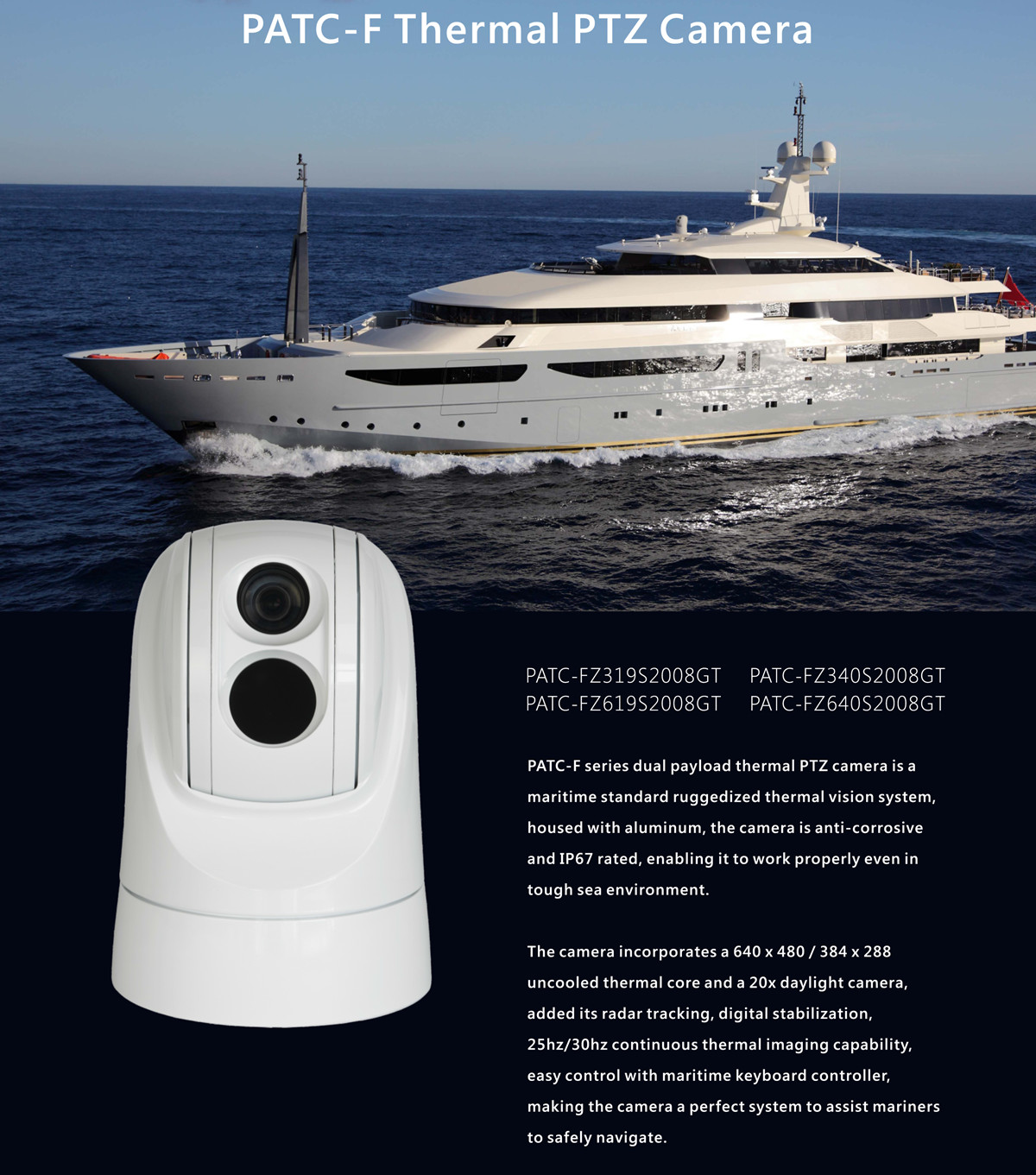
Cleaning Lenses and Housing
You must keep your maritime dual ptz camera clean to ensure clear images and reliable operation. Salt spray, dust, and grime can quickly build up on the lens and housing in a marine environment. For best results, clean the camera at least once a week, or more often if you notice visible residue. Use a soft, lint-free or microfiber cloth to wipe the lens and housing. Microfiber cloths trap dirt and prevent scratches, which helps maintain the optical quality of your ptz camera.
Tip: Always avoid harsh chemicals or abrasive materials. These can damage the lens coating and compromise image quality.
The following table outlines the safest and most effective cleaning materials for maintaining and cleaning your camera:
|
Recommended Solutions |
Why It Works |
Not Recommended |
Why It's Harmful |
|---|---|---|---|
|
Lens cleaning solution |
Formulated for optical surfaces |
Household glass cleaner |
Contains harsh chemicals that damage lens coatings |
|
Distilled water |
Pure, leaves no mineral residue |
Tap water |
Leaves mineral deposits that can etch lens surface |
|
Pre-moistened lens wipes |
Convenient, properly formulated |
Regular wet wipes |
May contain oils or alcohol that damage coatings |
You should always check for streaks or smudges after cleaning. If you see any, repeat the process with fresh materials.
Inspecting for Corrosion and Damage
The marine environment exposes your ptz camera to salt, moisture, and constant movement. These factors can cause corrosion, rust, and physical wear. During each cleaning, check all camera mounts and fasteners for signs of rust or salt buildup. Examine the housing for cracks, dents, or water damage. Check the lens for scratches or cloudiness that may affect image quality.
You should also check the electrical connections and seals. Make sure they remain tight and free from corrosion. If you notice any damage, schedule maintenance immediately to prevent further issues. Regular inspection and cleaning help extend the life of your camera and ensure it performs reliably in any environment.
PTZ Camera Maintenance Schedule
Daily and Weekly Tasks
You need to follow a consistent ptz camera maintenance routine to keep your maritime dual ptz camera operating at peak performance. Daily and weekly tasks focus on preventing issues before they affect recording or image quality. You should inspect the camera for visible dirt, salt, or debris. Clean the lens and housing using recommended solutions. Check all mounts and fasteners to ensure the camera remains secure. Review the ptz camera’s movement and presets. Limit unnecessary tours or preset cycles to extend the ptz lifespan.
Here is a daily and weekly checklist for your ptz camera:
-
Inspect the camera for salt buildup, dust, or water spots.
-
Clean the lens and housing with a microfiber cloth and approved solutions.
-
Check mounts and brackets for signs of corrosion or physical damage.
-
Verify that the ptz camera moves smoothly and responds to controls.
-
Review footage for any obstructions or image quality issues.
-
Confirm that recording functions operate as expected.
-
Check power supply and connections for stability.
Tip: Limiting the number of automated tours or preset cycles reduces wear on the ptz motor and extends the camera’s lifespan.
Monthly and Quarterly Checks
You must perform more thorough checks at monthly and quarterly intervals. These checks help you identify deeper issues and ensure the ptz camera remains reliable in a harsh environment. You should review system logs, check for firmware updates, and inspect all electrical connections. After storms or severe weather, check the camera and cables for corrosion or damage. Conduct a risk assessment based on the value of monitored items and environmental risks.
The following table outlines recommended monthly and quarterly checks for your ptz camera:
|
Check Type |
Frequency |
Notes |
|---|---|---|
|
System Health Check |
Quarterly |
Check logs, ensure cameras are operational, and review footage for obstructions. |
|
Environmental Check |
After storms |
Inspect cameras and cables for corrosion and damage, especially in coastal areas. |
|
Risk Assessment |
As needed |
Frequency may increase based on the value of monitored items and environmental risks. |
|
Firmware and Settings Check |
Quarterly |
Update firmware and document settings during system health checks. |
You should also verify compliance with industry standards and certifications. Certifications such as IEC 60945 for maritime navigation equipment, MIL-STD-810 for military environmental testing, DNV-GL or ABS type approval, and IP67 ingress protection for exposed installations confirm that your ptz camera meets rigorous requirements for marine environments.
Note: Always document your maintenance actions and checks. Keeping detailed records helps you track performance and identify recurring issues.
A structured maintenance schedule ensures your maritime dual ptz camera stays reliable. Regular cleaning, inspection, and system health checks protect your investment and keep your camera ready for any challenge.
Environmental Protection for PTZ Cameras
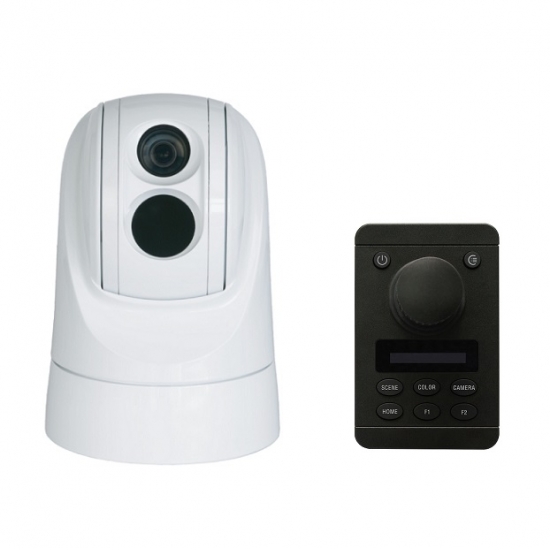
Installation and Protective Measures
You must install your maritime dual ptz camera in locations that shield it from direct exposure to saltwater, wind, and extreme weather. Choose sites with overhead protection or use marine-grade enclosures to reduce environmental stress. When you select a rugged design with an IP68+ rating, you ensure the camera withstands dust, water immersion, and harsh conditions. The table below highlights features that improve camera durability in marine environments:
|
Feature |
Description |
|---|---|
|
Rugged Design |
Suitable for maritime environments, resists harsh weather |
|
IP68+ Rating |
Protects against dust and water immersion |
|
Continuous Operation |
Reliable performance in demanding conditions |
You should also use protective covers and enclosures designed for impact resistance and weatherproofing. Polycarbonate or tempered glass covers provide high impact resistance and vandal protection. Double-gasket cable glands prevent water ingress, which often causes corrosion and power loss. Marine-grade aluminum and stainless hardware resist salt air and extend the camera's lifespan. Dotworkz enclosures with IP66, IP67, or IP68 ratings offer robust protection against extreme weather and vandalism.
Tip: Anti-reflective coatings on covers enhance clarity and zoom performance, which is crucial for identification tasks.
You need to check mounting hardware regularly for corrosion and physical damage. Saltwater exposure can cause rapid corrosion, so monthly maintenance is essential. If you notice any signs of rust or moisture buildup, clean the affected areas and replace damaged parts immediately.
Managing Power and Storage
You must ensure a stable power supply for your ptz camera. Use 24VAC power supplies and connect conductors directly to transformer terminals for optimal performance. Select the correct wire gauge: 18 AWG for short runs, 16 AWG for up to 200 feet, and 14 AWG for longer distances or high-current cameras. Proper grounding protects against electrical faults. Mount power supplies in dry, ventilated locations to prevent overheating. Always use UL-listed equipment to meet safety standards.
Consider installing a UPS or backup batteries to maintain power during outages. You should check power connections and grounding during every maintenance routine. If you store the camera when not in use, choose a dry, climate-controlled area. Clean and check the camera before storage to prevent corrosion and moisture damage.
Note: Environmental factors such as saltwater and humidity increase maintenance needs. Marine-grade cameras with proper weatherproofing have shown zero failures over three years when you follow these best practices.
Regular checks and proactive measures protect your ptz camera from environmental hazards and extend its lifespan.
Firmware, Software, and Hardware Checks
Updating PTZ Camera Software
You need to keep your ptz camera software and firmware up to date. Manufacturers release updates to address security vulnerabilities and improve performance. Regular updates help your maritime dual ptz camera operate reliably in challenging marine environments. You should schedule a check for new firmware at least once every quarter. Visit the manufacturer's website or use the camera management platform to download the latest version. Always back up your settings before you start the update process.
Tip: Enable automatic notifications for firmware releases if your ptz camera supports this feature. This step ensures you never miss critical updates.
After you complete the update, test the ptz camera functions. Confirm that pan, tilt, and zoom controls respond correctly. Review recording quality to verify that the update did not affect image clarity or storage.
Electrical and Mechanical Inspection
You must inspect the electrical and mechanical components of your ptz camera on a regular basis. Start with a visual check of all power supplies, wiring, and connectors. Look for signs of corrosion, fraying, or loose connections. Use the following checklist to guide your inspection:
-
Check power supply voltage and stability.
-
Inspect wiring for wear, salt buildup, or damage.
-
Examine connectors for tightness and corrosion.
-
Test ptz motor movement for smooth operation.
-
Verify that the camera returns to presets accurately.
If you notice any irregularities, address them immediately to prevent system failure. You should also listen for unusual noises during ptz movement. These sounds may indicate mechanical wear. Schedule professional maintenance if you detect persistent issues. Consistent checks and timely repairs keep your ptz camera reliable and extend its service life.
Troubleshooting and Professional Maintenance
Common PTZ Camera Issues
You may encounter common issues with your maritime dual ptz camera during regular surveillance operations. Quick identification and resolution of these problems help maintain stable surveillance performance and reliable operation. Here are practical solutions for the most frequent challenges:
-
Check your WiFi signal strength. Weak signals often cause video dropouts or lag.
-
Restart your router and camera. This simple step resolves many temporary glitches.
-
Check for firmware updates. Manufacturers release updates to fix bugs and improve compatibility.
-
Adjust network settings. Change wireless channels or enable protocols like UPnP if you experience persistent connectivity issues.
-
Check your internet bandwidth. Insufficient bandwidth can affect footage quality and streaming.
-
Adjust video quality settings. Lowering resolution may improve performance on slow connections.
-
Clear cache and temporary data on your viewing device. This step can resolve streaming problems.
-
Update camera firmware regularly. Updates often address video and streaming issues.
-
Check power connections. Ensure cables and adapters function correctly.
-
Inspect for physical damage. Look for cracks, dents, or water damage on the camera.
-
Reset the camera if problems persist. Follow the manufacturer's instructions for a proper reset.
-
Contact customer support for advanced troubleshooting or repair.
Tip: Regular system health check routines help you catch issues early and keep your ptz camera running smoothly.
When to Call a Professional
Some problems require expert servicing to protect your investment and ensure long-term surveillance reliability. You should schedule professional maintenance when you notice any of the following:
-
Repeated loss of camera signal after basic troubleshooting.
-
Evidence of water ingress, corrosion, or severe physical damage.
-
PTZ motor failure or erratic movement during system health check.
-
Persistent power supply issues despite cable and connection checks.
-
Unexplained gaps or corruption in recorded footage.
Professional technicians have the tools and expertise to perform in-depth diagnostics, repairs, and scheduled servicing. They can also verify compliance with industry standards and conduct a comprehensive system health check. Rely on experts for complex repairs to avoid further damage and ensure your maritime dual ptz camera delivers reliable surveillance solutions.
Note: Document all maintenance and servicing actions. Detailed records support warranty claims and help track recurring common issues.
You keep your maritime dual ptz camera reliable when you follow a structured maintenance routine. Regular check of the lens, housing, and mounts ensures clear video and stable operation. You extend the lifespan of your camera when you use protective housings and perform consistent check of all connections. Always check for corrosion, clean the lens, and review system health. Schedule professional maintenance and check your system often to prevent costly downtime.
-
Consistent check of your camera helps you spot issues early.
-
Protective housings shield your camera from harsh weather.
-
Regular cleaning ensures clear video and effective surveillance.
-
Scheduled check of all components maintains optimal performance.
Take action now. Set a maintenance schedule and check your maritime dual ptz camera regularly for long-term reliability.
FAQ
How often should you perform a physical check on your maritime dual PTZ camera?
You should perform a physical check every week. Inspect the lens, housing, and mounts for corrosion or damage. This routine helps you spot issues early and maintain optimal performance in your security camera system.
What is a system health checklist for maritime cameras?
A system health checklist includes reviewing logs, checking firmware updates, inspecting power connections, and testing PTZ movement. You use this checklist to ensure your system operates reliably and meets industry standards.
Why is it important to check your camera system after severe weather?
You need to check your camera system after storms to detect corrosion, water damage, or loose connections. Early detection prevents costly repairs and keeps your system functioning in harsh marine environments.
How do you update the software in your system?
You visit the manufacturer’s website or use the camera management platform. Download the latest firmware and follow the instructions. Always back up settings before updating. Test all functions after the update to confirm proper operation.
What maintenance tasks help extend the life of your security camera system?
You clean the lens and housing regularly, inspect mounts, update firmware, and check power supplies. Consistent maintenance protects your system from environmental hazards and ensures reliable surveillance.
Tip: Schedule routine maintenance to maximize the lifespan and reliability of your maritime dual PTZ camera system.



 +8613725587481
 sales@winsafecctv.com